Welcome to Janalix
Learn what Janalix is for, how work is organized, and where to go first based on your role.
Janalix is built for controlled HR document workflows. The fastest way to feel productive is to understand the workflow model first, then start from your role-specific guide.
Who this is for
HR Admin, Approver, Employee, Auditor
Estimated time
4 minutes
Category
Start Here
Next best action
Open the workflow or role guide that comes immediately after this page.
Before you start
Janalix is built around controlled HR document workflows, not loose file storage. Every important record has an owner, a state, and an evidence trail.
The fastest way to get productive is to understand two things first: which role you are working in, and which workflow state the record is currently in.
- Use role guides when you are onboarding a person into Janalix.
- Use workflow guides when a person needs to complete work right now.
- Use reference pages when you need a rule or status explained quickly.
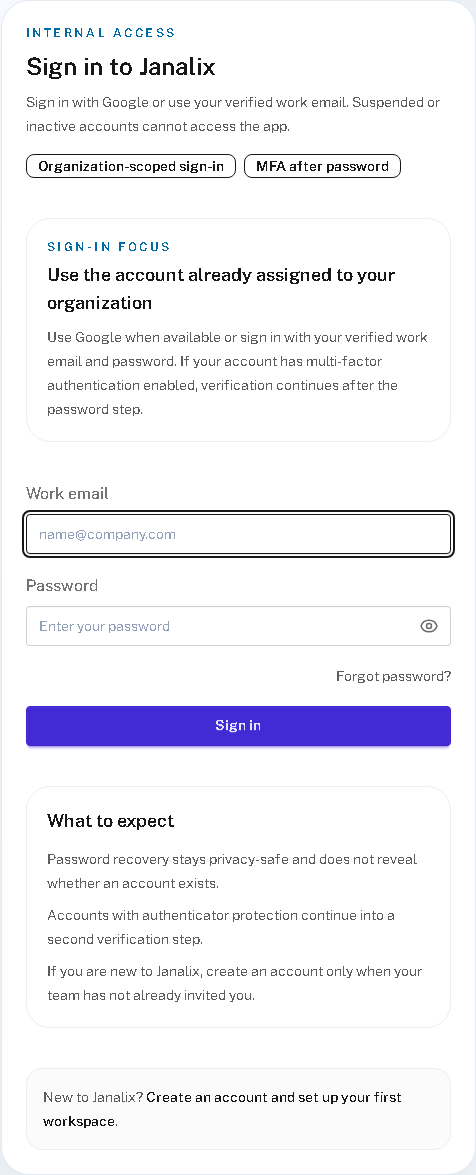
Real product screenshot
For most users, the first product surface is the controlled sign-in flow
- 1
The entry point already teaches boundaries
The sign-in screen reinforces that Janalix is organization-scoped and tied to a real work identity, not a generic file tool.
- 2
The next useful page should not be another auth explanation
Once a user is through sign-in, the docs should quickly hand them into the right role guide or the dashboard.
- 3
Use docs to shorten the distance to real work
The role guide, dashboard, and workflow pages should answer what the person needs to do next instead of making them browse broadly.
Choose the page type that matches the real need
This keeps users moving instead of reading in circles.
Onboarding
Role guides
Best when a person is new and needs to understand their part of Janalix fast.
Execution
Workflow guides
Best when someone already has a task and needs the exact steps for that job.
Lookup
Reference pages
Best when the question is about a rule, boundary, or workflow status.
Orientation
Dashboard guidance
Best when a user needs to decide what deserves attention first after sign-in.
Follow these steps
- Open the role guide that matches the work you will perform most often.
- Review the main document statuses so active, waiting, and retained work make sense.
- Use the dashboard after sign-in to see what needs attention first and which queue to open next.
- Return to the workflow guides whenever the next action is not obvious from the current record state.
Success checks
The outcome is obvious and verifiable
You know which role guide to open next.
You understand that Janalix tracks records through explicit workflow states.
You know the dashboard is the fastest place to orient yourself after sign-in.
Freshness and feedback
Keep this page current and useful
Use these details to judge whether the guide still looks current, and send a quick note if anything feels unclear, outdated, or incomplete.
- Last reviewed
- April 19, 2026
- Owner
- Janalix Team
Was this page helpful?
Send quick feedback so the docs stay practical for the next person.
Related guides
Keep moving with the next useful pages
Use related guides when you want a nearby task, a role-specific view, or a reference page that supports the workflow you just finished.
Set Up Your First Workspace
Create a clean starting environment so your team can begin working without role, naming, or ownership confusion.
HR Admin Quick Start
Learn the shortest path from setup to running controlled employee document workflows as an HR Admin.
Approver Quick Start
Understand how to review assigned documents quickly and safely without taking on HR admin work.