Use The Dashboard
Read the dashboard the right way so you can decide what needs attention first.
The dashboard is designed to help you decide, not to show every possible metric. Focus on urgent actions, compliance risk, and recent activity first.
Who this is for
HR Admin, Approver, Auditor
Estimated time
4 minutes
Category
Start Here
Next best action
Open the workflow or role guide that comes immediately after this page.
Before you start
The dashboard is a decision surface. It should help you decide what needs attention first, not replace the deeper workflow views behind each metric or queue.
- Read urgent actions first.
- Use compliance and workflow summaries to spot risk.
- Open the linked work queue when the dashboard shows something actionable.
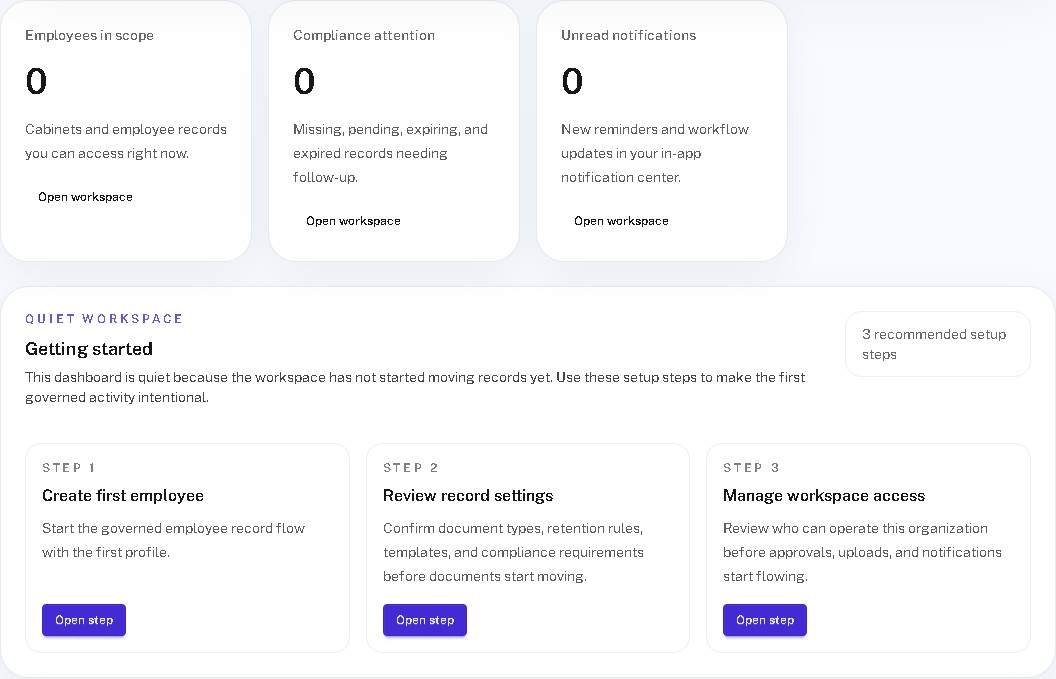
Real product screenshot
The dashboard should answer one question first: what deserves attention now?
- 1
Urgent actions are the best first scan
They tell you where a decision, follow-up, or blocked record is already waiting.
- 2
Compliance signals show future pain early
Missing or expiring items are easier to fix while they are still small and visible.
- 3
The queue matters more than the card
The dashboard should point you to work, not convince you to stay on the overview screen.
Follow these steps
- Scan the highest-priority cards or queue counts at the top of the dashboard first.
- Use recent activity and status summaries to understand what changed recently and why it matters.
- Open the linked queue, cabinet, or workflow view to complete real work instead of lingering on the overview.
- Return to the dashboard after important actions to confirm the next priority is now clear and smaller.
A healthy dashboard habit
- ✓
Use the dashboard to prioritize, not to replace deeper workflow views.
- ✓
Jump into the linked queue when a card shows a real next action.
- ✓
Come back after meaningful work to confirm the priority picture changed as expected.
Success checks
The outcome is obvious and verifiable
You can identify the next operational action from the dashboard in one scan.
You know where to jump from the dashboard into the underlying workflow screen.
You are not relying on the dashboard as a substitute for role-specific work queues.
Freshness and feedback
Keep this page current and useful
Use these details to judge whether the guide still looks current, and send a quick note if anything feels unclear, outdated, or incomplete.
- Last reviewed
- April 19, 2026
- Owner
- Janalix Team
Was this page helpful?
Send quick feedback so the docs stay practical for the next person.
Related guides
Keep moving with the next useful pages
Use related guides when you want a nearby task, a role-specific view, or a reference page that supports the workflow you just finished.
HR Admin Quick Start
Learn the shortest path from setup to running controlled employee document workflows as an HR Admin.
Approver Quick Start
Understand how to review assigned documents quickly and safely without taking on HR admin work.
Track Compliance Status
Use compliance views to identify missing, expiring, and valid records before they turn into operational risk.