Set Up Your First Workspace
Create a clean starting environment so your team can begin working without role, naming, or ownership confusion.
A good first workspace setup keeps later workflow, access, and audit questions simple. Treat it like the foundation for every document and approval you add later.
Who this is for
HR Admin, System Admin
Estimated time
6 minutes
Category
Start Here
Next best action
Open the workflow or role guide that comes immediately after this page.
Before you start
A clean first workspace prevents role confusion later. Think of the workspace as the operating boundary for your team's records, approvals, and audit history.
- Choose a workspace name your team will recognize immediately.
- Decide who will own setup and access management from day one.
- Keep the initial setup simple instead of over-modeling every edge case.
A strong first workspace feels boring in the best way
Before you invite the wider team, make sure the basics are stable and easy to explain.
- ✓
The workspace name matches the organization or team people already use.
- ✓
At least one trusted admin can sign in and manage setup tasks.
- ✓
The dashboard loads as a clean starting point instead of a confusing partial state.
Real product screenshot
The first workspace is shaped during account creation
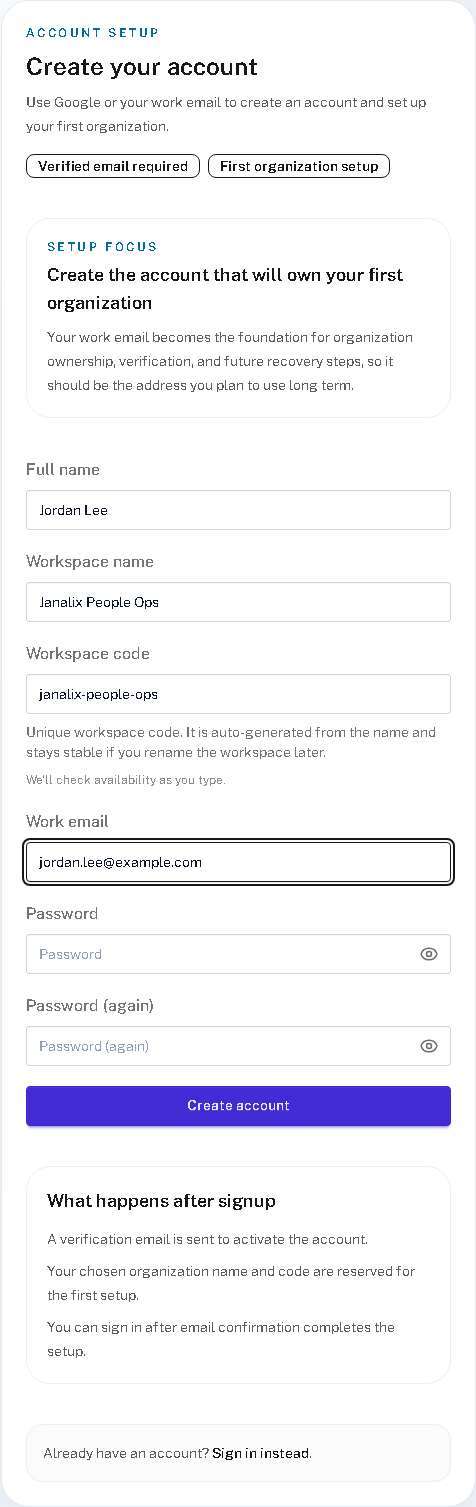
- 1
Workspace naming is not a cosmetic detail
If the name and code are easy to say and recognize here, later invitations and dashboards stay clearer too.
- 2
The first account becomes the first boundary owner
The work email and account owner should be the person who can responsibly verify setup and widen access later.
- 3
Verification comes before the workspace becomes live
That keeps the foundation deliberate instead of letting an unverified setup drift into real workflow use.
Follow these steps
- Create the workspace with a clear organization or team name that people already recognize.
- Confirm the primary admin can sign in and reach the dashboard without errors or setup dead ends.
- Check that the workspace identity is consistent across header, dashboard, and invitation surfaces.
- Move straight into team invitations so work ownership is shared before the first real workflow begins.
Success checks
The outcome is obvious and verifiable
The workspace name is clear and not duplicated.
At least one trusted admin can manage setup tasks.
The dashboard shows a clean starting state rather than a broken or partial setup.
Freshness and feedback
Keep this page current and useful
Use these details to judge whether the guide still looks current, and send a quick note if anything feels unclear, outdated, or incomplete.
- Last reviewed
- April 19, 2026
- Owner
- Janalix Team
Was this page helpful?
Send quick feedback so the docs stay practical for the next person.
Related guides
Keep moving with the next useful pages
Use related guides when you want a nearby task, a role-specific view, or a reference page that supports the workflow you just finished.