Invite Your Team
Bring the right people into Janalix with clear role assignments from the beginning.
Invitations are where many permission mistakes begin. A small amount of planning here prevents messy cleanup later.
Who this is for
HR Admin, System Admin
Estimated time
5 minutes
Category
Start Here
Next best action
Open the workflow or role guide that comes immediately after this page.
Before you start
Invitations set the tone for access control. It is much easier to start with the right role than to clean up broad access after people have already begun working.
- List each person you want to invite and the job they should perform.
- Separate HR admin work from approver, employee, and auditor access.
- Keep temporary access exceptions rare and easy to explain.
Invite prep before you click send
- ✓
You know which users truly need admin access versus approver or employee access.
- ✓
You can explain each role assignment in one short sentence.
- ✓
You are not using broad access as a shortcut for unclear process ownership.
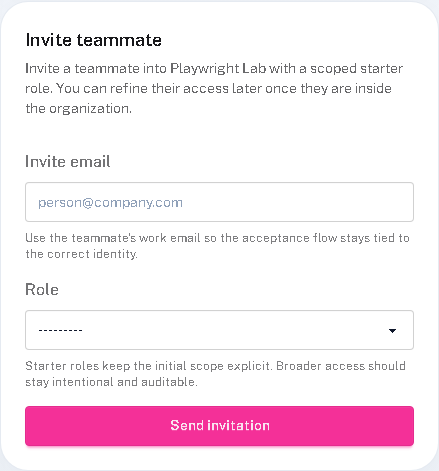
Real product screenshot
The invitation flow is where scope becomes real
- 1
Set the role before the user arrives
The cleanest access pattern is one where people land with the right scope on day one.
- 2
Watch the first accepted invites closely
That is the easiest place to catch role mistakes before they spread into live workflow confusion.
- 3
Treat broad roles as exceptions
If a role feels too wide to explain clearly, it probably deserves another review before you send it.
Follow these steps
- Prepare the invite list with the correct role for each user before you send anything.
- Send invitations from the workspace that will own the records and workflow history.
- Verify key users can accept the invite and land in the expected workspace without detours.
- Review the first few accepted accounts to confirm the role assignments match real work, not assumptions.
Success checks
The outcome is obvious and verifiable
Invited users received access successfully.
Role assignments match the work each person should perform.
No one needed an emergency permission change immediately after joining.
Freshness and feedback
Keep this page current and useful
Use these details to judge whether the guide still looks current, and send a quick note if anything feels unclear, outdated, or incomplete.
- Last reviewed
- April 19, 2026
- Owner
- Janalix Team
Was this page helpful?
Send quick feedback so the docs stay practical for the next person.
Related guides
Keep moving with the next useful pages
Use related guides when you want a nearby task, a role-specific view, or a reference page that supports the workflow you just finished.
Understand Roles And Permissions
See how Janalix separates responsibilities so sensitive HR records stay controlled and auditable.
HR Admin Quick Start
Learn the shortest path from setup to running controlled employee document workflows as an HR Admin.
Approver Quick Start
Understand how to review assigned documents quickly and safely without taking on HR admin work.